Dispatch, the apparatus screen & the station

The page reaches everyone, and the crew knows who's coming.

Calls arrive from your CAD, a dispatch email or your text pages, page the members each call needs, and land on a live call board shared by the apparatus screen, the unit status board and the station TV.

Dispatch & alerting

Members answer from the alert itself.

Calls in from anywhere

  • CAD webhooks for Motorola PremierOne and Tyler New World, plus a generic endpoint for any CAD that can send one
  • A dispatch email address or your existing text pages: set up the format once, and every page becomes a call in Reskyr
  • Every CAD message logged, so a missed page can always be traced
  • Test calls that ring only the officer and stay out of NERIS and your statistics
Alerts to the right members

  • Free push alerts to every member's phone at every tier, answered from the alert itself: responding to the station, direct to scene or not responding
  • Page by station, unit crew, rank, platoon or a list, so a medical assist doesn't wake the whole roster
  • A second wave goes out on its own when too few members respond
  • An optional text add-on as a backup for members who miss the push, answered by replying 1 or 2 Launching soon
  • A reachability check that shows officers who has no phone registered or a phone that's failing

Broadcasts with acknowledgment

  • Recalls, weather callbacks and reminders by push and email, plus text with the add-on
  • See who acknowledged and remind the rest in one tap
  • A warning on the call when everyone is going direct and no apparatus may be en route
Apparatus screen, unit status & tracking

Every rig knows the call, and every board knows every rig.

Apparatus screen

  • A big-button call card with type, priority, cross street, units, times and CAD notes
  • Everything known about the address: pre-plan, hazmat, life-safety registry, open violations, active permits and the most recent prior calls at the address
  • National Weather Service warnings for the call's location and one-tap navigation
  • Set a mounted tablet to its unit once, and it stays with that rig

Live unit status & tracking

  • En route, on scene, transporting, returning and available, one tap each
  • Unit times go straight onto the incident report
  • Every board and the Command Center update within seconds
  • A mounted tablet reports the rig's position, so units and their routes show live on the map

Recommended units

  • Rank units for each response area and tag what each one can do
  • Each call recommends who to send, skipping units that are busy or out of service
  • Officers accept or change the recommendation in one tap
  • Units that are busy, in reserve or out of service are left off the recommendation
The station TV

A new call takes over the bay TV before the tones finish.

Call takeover

  • The address, call type, units, elapsed time and pre-plan hazards fill the screen within seconds
  • With a visual pre-plan at the address, its site plan shows beside the call
  • A two-tone call alert plays on the TV
  • Each TV is paired with a short code, and one can be removed without touching the others
  • Coverage gaps show at a glance when a station's engine is out on another call or at training

A board for every room

  • Twenty panel types, from staffing and open shifts to inspections due, weather and announcements
  • Zones and rotating pages per department, station, shift or individual TV, with night layouts
  • TV roles for the bay, officer's quarters and day room, plus a lobby mode that never shows calls, addresses or names
  • The training topic of the day, with attendance logged in one tap, and the station's visitors and deliveries

The Reskyr Station app

  • Runs on Apple TV, Android TV, Google TV and Fire TV Coming to the app stores
  • Plays the call tone without anyone touching the remote and keeps the screen awake
  • Any other screen with a web browser can show the station board too
On scene & after the call

The crew list, the clock and the record take care of themselves.

Command

  • ICS board with sectors, assignments and timed PAR checks
  • Live Activity on iPhone for the active call
  • A call board for CarPlay and Android Auto Pending Apple & Google approval
  • Officers can clear, cancel or reopen a call, or page out a call they entered by hand

Responders become the crew

  • Add everyone who answered the call to the report's crew in one tap
  • LOSAP points credited automatically for incident crews, training, meetings and events
  • Every member's response history, plus a department CSV for LOSAP or call-volume reports

Response analytics

  • Each member's share of calls answered
  • Turnout and travel times, median and 90th percentile
  • By unit, station and call type, plus time to the first unit on scene by hour of day
Visual pre-plans

Draw the plan on the building itself.

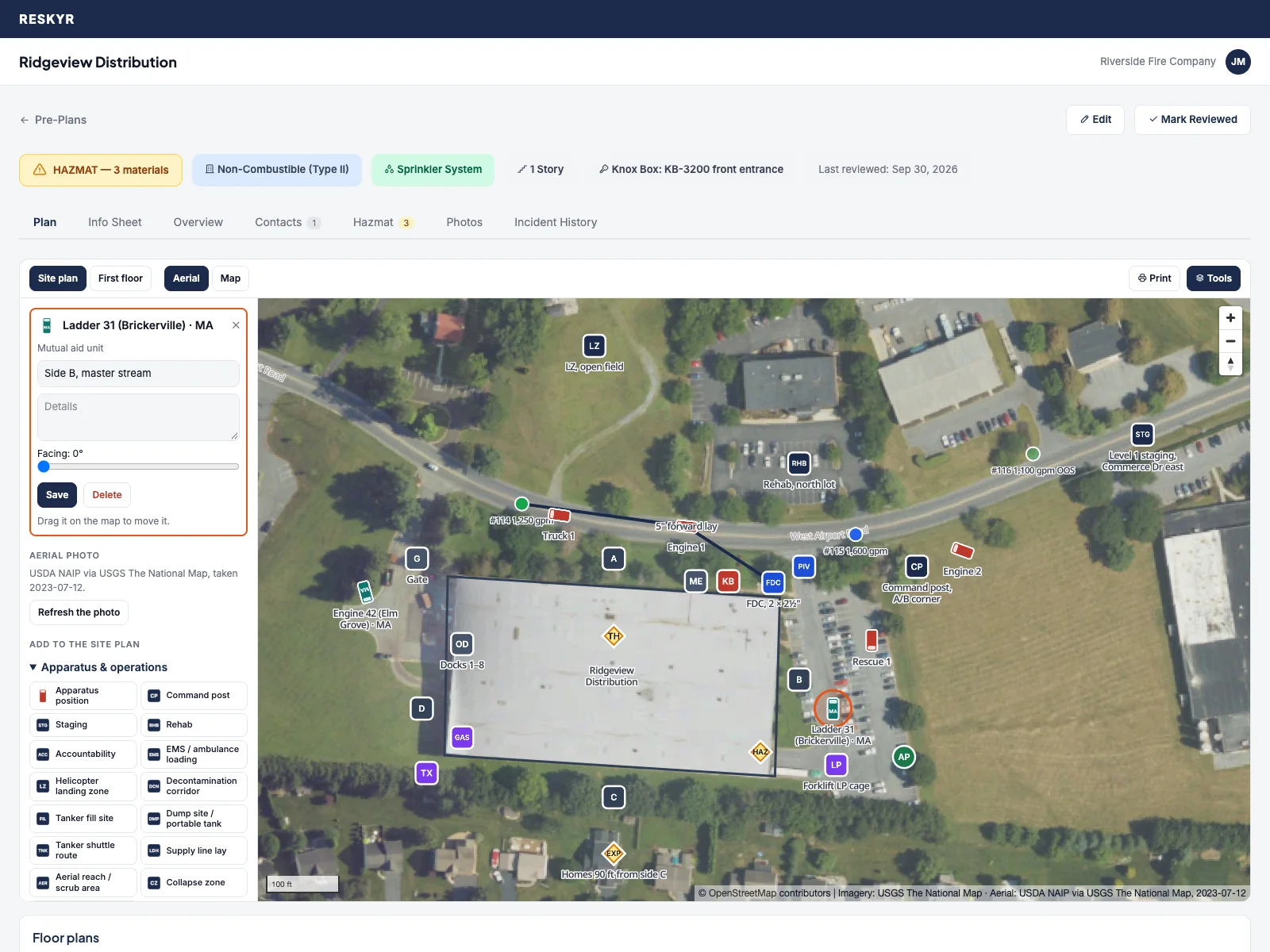
Every pre-plan opens on its own aerial photo. Place your apparatus where they should park, mark the command post, FDC, Knox box, shutoffs and hazards, draw supply lines and collapse zones, and add each floor from a drawing or PDF. When a call comes in at that address, the plan is on the station TV next to the call.

A sample warehouse pre-plan. The building and department are sample data; the aerial photo is USDA NAIP imagery from the USGS National Map.
A site plan on an aerial photo with apparatus positions, the command post, FDC, Knox box, hazards and a mutual aid ladder selected
Your own units come from your roster; mutual aid units are marked in teal.
  • Apparatus positions for your own units, facing the way they should park, and mutual aid units by department
  • Command post, staging, rehab, landing zone, tanker fill and dump sites
  • FDC, standpipes, PIV, riser, alarm panel, Knox box, gas and electric shutoffs, solar shutdown, battery storage
  • Hazmat linked to the material list, target and structural hazards, exposures
  • Evacuation points, shelter-in-place and occupants who need help
  • Hydrants within 1,000 ft come from your hydrant log, colored by flow
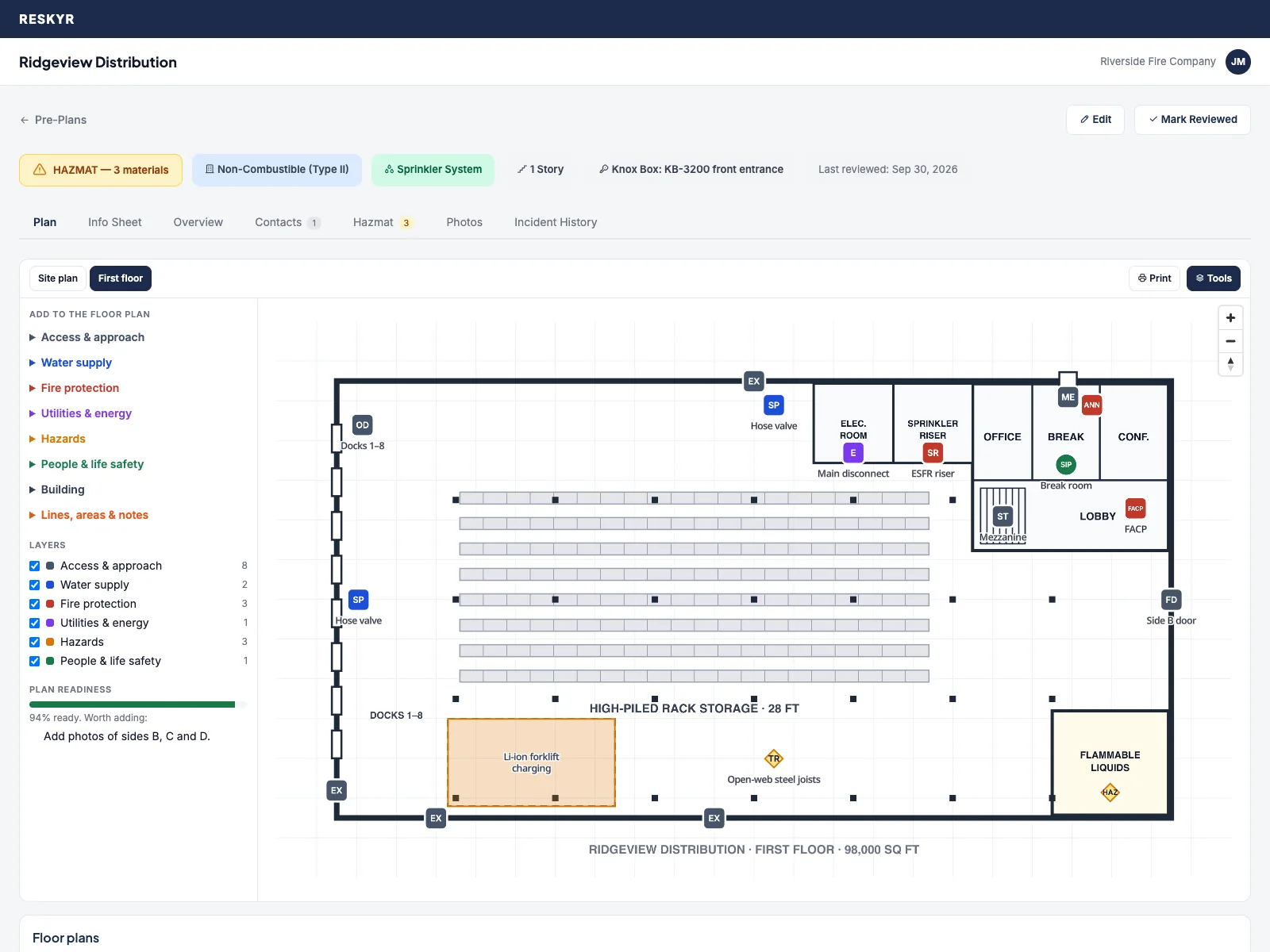
A warehouse floor plan with stairs, exits, the sprinkler riser, alarm panel, hose valves and the flammable liquids room marked
Floor plans from any drawing or PDF, marked with the same symbols.
  • An aerial photo of the building from free public imagery, at no extra cost, with a refresh button when newer imagery comes out
  • One info sheet: roof and truss, sprinklers, standpipes, alarm monitoring, special tactics and alarm assignments
  • Gate codes and Knox contents only for the people your department chooses
  • Print every sheet with a legend for the rig
  • A readiness check suggests what's worth adding, like an FDC on a sprinklered building
  • Who can draw is a permission in Roles & Access
Pre-plans, water supply & maps

What the crew wishes they knew before the door opens.

The pre-plan and address hazards show on the apparatus screen on their own, the incident report flags that a pre-plan exists, and the station TV shows the hazard summary.

Pre-plans

  • Construction, occupancy, sprinklers, Knox box, 24-hour contacts, hazmat inventory and floor-by-floor photos
  • Drawn on an aerial photo: apparatus positions, FDC, shutoffs, hazards and floor plans (above)
  • A one-line hazard summary rides on every dispatch alert and the TV takeover
  • Review cycles with overdue reminders, compliance by station, and CSV import
  • Emergency Response Guidebook lookup by UN number or name, linked from the pre-plan

Water supply

  • Hydrant inventory with NFPA 291 flow color-coding, inspections and flow tests
  • A failed inspection takes a hydrant out of service; a flow test sets its rating and color
  • Import the water utility's CSV or GIS file, thousands of hydrants at once, with a preview
  • Inspection zones by station and crew, and each hydrant's flow-test trend
  • NFA and ISO needed fire flow on the pre-plan, against what nearby hydrants can supply

Maps & mutual aid

  • Incidents, stations, hydrants and live unit positions on one map
  • Draw each station's first-due area once; each call with a map location is tagged with its first-due station
  • Where your response areas overlap neighboring departments that also use Reskyr
  • Every mutual aid agreement on file with its dates and contacts
  • Hydrants near me, cached on the phone for inspections without signal

Run your next call on Reskyr.

Connect your CAD or forward your text pages, and every member gets the alert on their phone. Request a trial and, once we confirm your department, get 30 days with every module. No credit card required.